
Melio built its business on a simple promise: pay your vendors without paying a subscription. For a restaurant group with three approvers and forty vendors, that was often the whole argument, and a good one.
Then Xero bought the company. If you run bill pay through Melio and you do not use Xero for accounting, you have probably wondered what that means for you, and whether the answer is "nothing" or "start looking." This guide covers what actually changed, what did not, when Melio is still the correct choice, and how the realistic alternatives compare once you sort them by what is actually driving your cost.
What actually happened
Xero announced its intent to acquire Melio in June 2025 and completed the deal on 15 October 2025. The consideration was roughly $2.5 billion: about $2.15 billion in cash plus approximately $360 million in Xero shares, with up to a further $500 million payable to Melio employees over three years. Matan Bar, Melio's co-founder and chief executive, took responsibility for the combined US business.
The strategic logic is not subtle. Xero is an accounting platform that was weak in US payments. Melio is a US payments platform that was not an accounting ledger. Buying Melio let Xero put bill payment directly inside its own product for American customers, which it did: by March 2026, Xero had embedded Melio's capabilities into its core product and launched US online bill payments.
That is the part worth sitting with. The acquisition was not primarily about running Melio.com as a standalone business. It was about acquiring a payments engine to put inside Xero.
What changed, and what did not
Being honest about this matters more than manufacturing urgency, so here is the split as it stands.
What has not changed. Melio.com still exists as a standalone product. The QuickBooks integrations are still supported. Your existing vendors, payment methods, and workflows did not disappear on completion day, and nobody was forced onto Xero. If your Melio setup works, it did not stop working.
What has changed. The product's centre of gravity moved. Melio's engineering priorities now sit inside a larger company whose primary US growth story is Xero-plus-payments, not standalone-Melio. That does not mean neglect, but it does mean that when roadmap tradeoffs arrive, the Xero-embedded experience has a structural claim on attention that the standalone product does not.
What is genuinely uncertain. Long-run pricing and packaging. Acquirers reprice acquired products, sometimes years later, and Melio's free-tier positioning is exactly the kind of thing that gets revisited once a strategic owner is looking at margin. There is no announcement to point at here. It is simply the risk you are carrying.
The question is not whether Melio still works today. It is whether the thing you originally bought Melio for is the thing its owner is now optimising.
When Melio is still the right answer
Plenty of businesses should stay put, and switching costs are real. Migration means rebuilding vendor records, approval rules, and accounting mappings, then verifying all three. That is a genuine week of somebody's life, and it is only worth spending against a concrete gap.
Stay with Melio if most of these describe you:
- Your payment volume is low enough that the included ACH allowance on your plan covers most months.
- You have a small number of approvers, so per-seat pricing elsewhere would be a step up in cost.
- Your accounting is QuickBooks Online and the existing sync does what you need.
- You do not run multiple legal entities with different approval chains.
- You are not paying large numbers of individual contractors who need tax forms in January.
If you are on Xero specifically, the calculus inverted in your favour. The embedded bill payments inside Xero are the whole point of the acquisition, and you are the customer that investment is aimed at.
The four reasons people actually leave
In this category, switching is almost never driven by a general feeling that something is expensive. It is driven by one of four specific breakages.
Approvals are too shallow. Entry-level bill pay tools tend to offer a single approval step. The moment you need conditional routing, for example anything over $5,000 also going to the owner, or invoices coded to one location routing to that location's manager, you have outgrown the tool. This is the single most common trigger.
Multi-entity or multi-location handling. Running several legal entities through one login, with separate approvers, separate GL mappings, and consolidated reporting, is the requirement that eliminates most cheap options. If you operate more than one restaurant, property, or venue under distinct entities, test this in a demo with your real structure rather than accepting a yes.
Payee volume rather than vendor volume. Paying 200 individual creators or contractors is a different problem from paying 40 vendors. It needs W-9 collection at onboarding, tax form generation at year end, and batch disbursement. General AP tools handle vendors well and payee rosters badly. If this is you, read our creator and talent agency payout guide rather than shopping AP software at all.
Integration depth. If you run an industry ERP or QuickBooks Desktop rather than QuickBooks Online, integration support decides this before pricing matters. Confirm which plan carries the integration you need, because that support is frequently reserved for a vendor's top tier.
Sorting the alternatives by what drives your cost
Feature grids are the wrong starting point. Two questions narrow the field faster than any comparison chart.
Is your cost driven by seats, or by payments? Eight people needing access and sixty payments a month means per-user pricing dominates your bill. Two people and six hundred payments a month means per-transaction fees dominate. These two profiles should shop completely differently.
Are you paying vendors, or paying people? Vendors send invoices and get paid on terms. People agree to a rate, do the work, and need a 1099 in January. AP software is built for the first. Payout platforms are built for the second.
Ramp
The closest like-for-like on the "no subscription" axis. Ramp offers bill pay on a free tier that includes invoice capture, approval workflows, and vendor management, with paid tiers above it for teams needing advanced controls or multi-entity support. Approvals are meaningfully deeper than entry-level bill pay tools.
The honest tradeoff: Ramp is a spend management platform first, and its economics assume you will also use its corporate card. If you want bill pay alone, you are adopting a broad platform for a narrow job. That is fine, but go in knowing it.
BILL
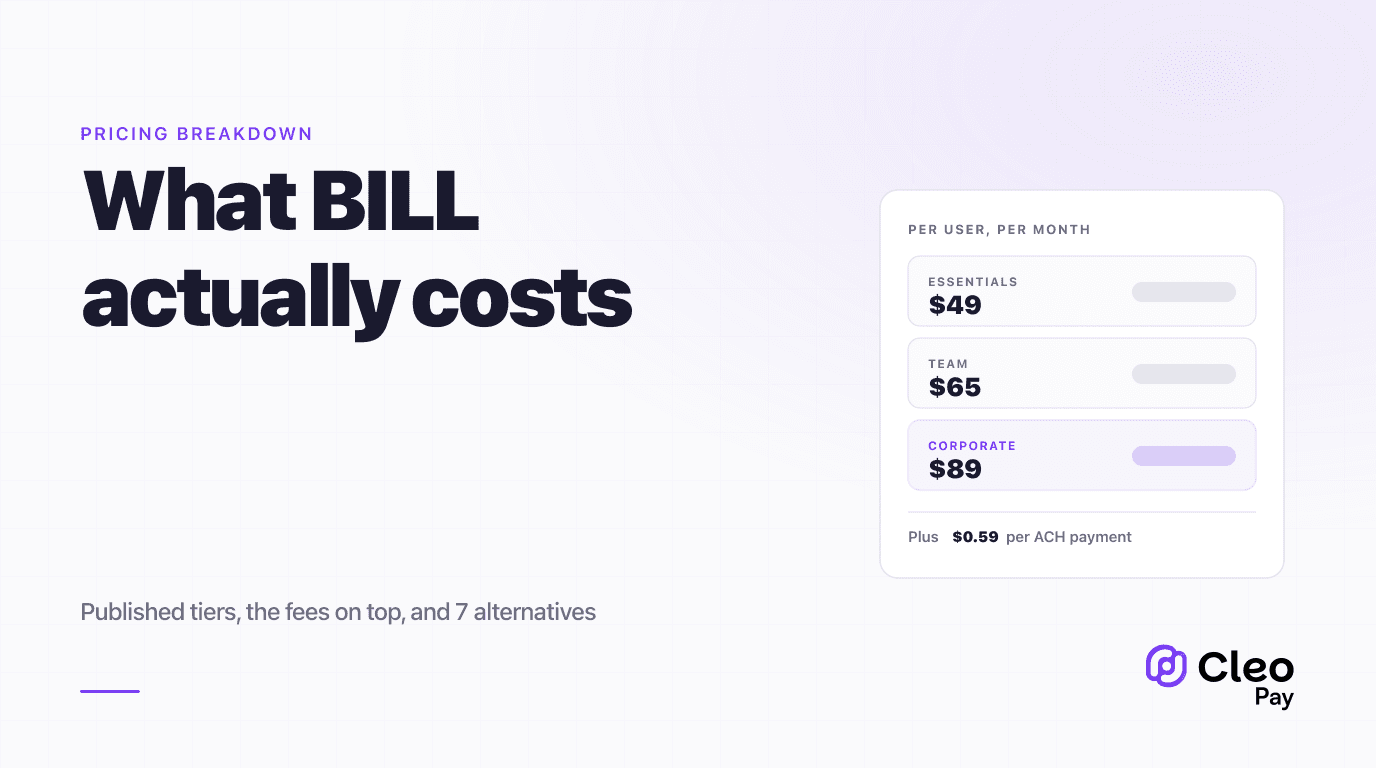
The default upgrade path, and the most mature product in the category. Published Accounts Payable pricing is $49, $65, and $89 per user per month across Essentials, Team, and Corporate, plus a custom-priced Enterprise tier. Payment fees sit on top: $0.59 per ACH, $11.99 for same-day ACH, $1.99 per check, $19.99 for an international USD wire, and 2.9% for card.
Two things catch people out. Automatic two-way accounting sync starts at Team, not Essentials, so budgeting on the entry price while assuming sync is wrong by $16 per user per month. And per-user pricing punishes exactly the businesses that need many light-touch approvers. Our full BILL pricing breakdown works this through at three company sizes.
QuickBooks Bill Pay
If your accounting is already QuickBooks Online and your requirements are modest, the native option removes an integration from your stack entirely, which has real operational value. It is also the weakest of these on approval depth and multi-entity handling. We cover where it holds up and where it does not in our QuickBooks Bill Pay guide.
Cleo Pay
Worth stating plainly that this is our product, so weigh it accordingly. The pricing model is bundled rather than per-seat: Get Paid free for vendors receiving payments, Starter from $79 per month billed yearly ($99 monthly) for two seats and 20 payments with $3 per additional payment, and Growth at $239 per month billed yearly ($299 monthly) for 5 seats and 100 payments with $2 per additional payment.
The reason that structure exists is the seat problem above. A hospitality group with a controller, three general managers approving their own locations' invoices, and an outside bookkeeper is five seats. On per-user pricing at the tier that includes automatic sync, that is a materially different monthly number than a bundled plan. Where bundled pricing loses is the opposite profile: one or two users sending very high payment volume will do better on a per-transaction model.
We maintain a side-by-side Cleo Pay and Melio comparison if you want the feature-level detail rather than the pricing shape.
The rails, and what they cost
Whatever you choose, the rail mix drives more of your bill than most buyers expect. Pull last quarter's payment report and count what you actually sent before you model anything.
- Speed
- 1–3 business days
- Cost
- $0.59 at BILL; typically the cheapest rail everywhere
- Best for
- The default for scheduled vendor bills
- Speed
- Same business day, subject to cutoff
- Cost
- $11.99 at BILL, roughly 20x standard
- Best for
- Avoiding a late fee or releasing a held delivery
- Speed
- 5–10 days including mail
- Cost
- $1.99 at BILL
- Best for
- Vendors who will not accept anything else
- Speed
- 1–3 business days
- Cost
- $19.99 at BILL
- Best for
- Overseas suppliers billing in USD
- Speed
- Immediate authorisation
- Cost
- 2.9% at BILL and commonly elsewhere
- Best for
- Extending working capital, at a price
Which one fits you
If you do decide to move
Contractor-heavy businesses have one extra thing to get right. The Form 1099-NEC reporting threshold rose from $600 to $2,000 for payments made in 2026 under the One Big Beautiful Bill Act, and is indexed from 2027. That reduces how many forms you file, but it does not reduce your obligation to collect a valid taxpayer identification number up front: backup withholding of 24% still applies to reportable payments when a payee has not provided one. If you migrate mid-year, make sure year-to-date payment totals move with the vendor records, or your January filing will be built on a partial year.
The short version
Xero completed its $2.5 billion acquisition of Melio in October 2025 and had embedded the payments capability into its own product by March 2026. Melio.com still runs, still supports QuickBooks, and has not forced anyone anywhere. If your setup works, the acquisition alone is not a reason to move.
What is worth acting on is the underlying question the acquisition prompted you to ask. Work out whether your cost is driven by seats or by payments, and whether you are paying vendors or paying people. Those two answers will sort the options faster than any feature grid, and they were the right questions before Xero ever made an offer.
If you run a restaurant group, a hotel, or another multi-location hospitality operation and want to see how bundled-seat pricing compares against per-user pricing on your actual payment history, book a walkthrough and bring last quarter's payment report.